> ## Documentation Index
> Fetch the complete documentation index at: https://docs.devin.ai/llms.txt
> Use this file to discover all available pages before exploring further.
# Custom Roles & RBAC
> Configure fine-grained access control with custom roles and role-based access control (RBAC) in Devin Enterprise.
## Overview
Custom roles and RBAC give you the ability to fine-tune access to the Devin application. Enterprise administrators can create custom roles with specific permissions and assign them to users or IdP groups, providing granular control over what actions users can perform within your Devin Enterprise deployment.
Devin Enterprise implements a two-tier role system with distinct scopes and capabilities: organization-level roles and account-level roles.
## Creating and Assigning Custom Roles
Enterprise admins or users with the **Manage Account Membership** permission are the only users who can configure custom roles. In your enterprise settings, go to **Membership** and select the **Roles** tab ([app.devin.ai/settings/membership?tab=roles](https://app.devin.ai/settings/membership?tab=roles)) to manage both organization-level and account-level roles.
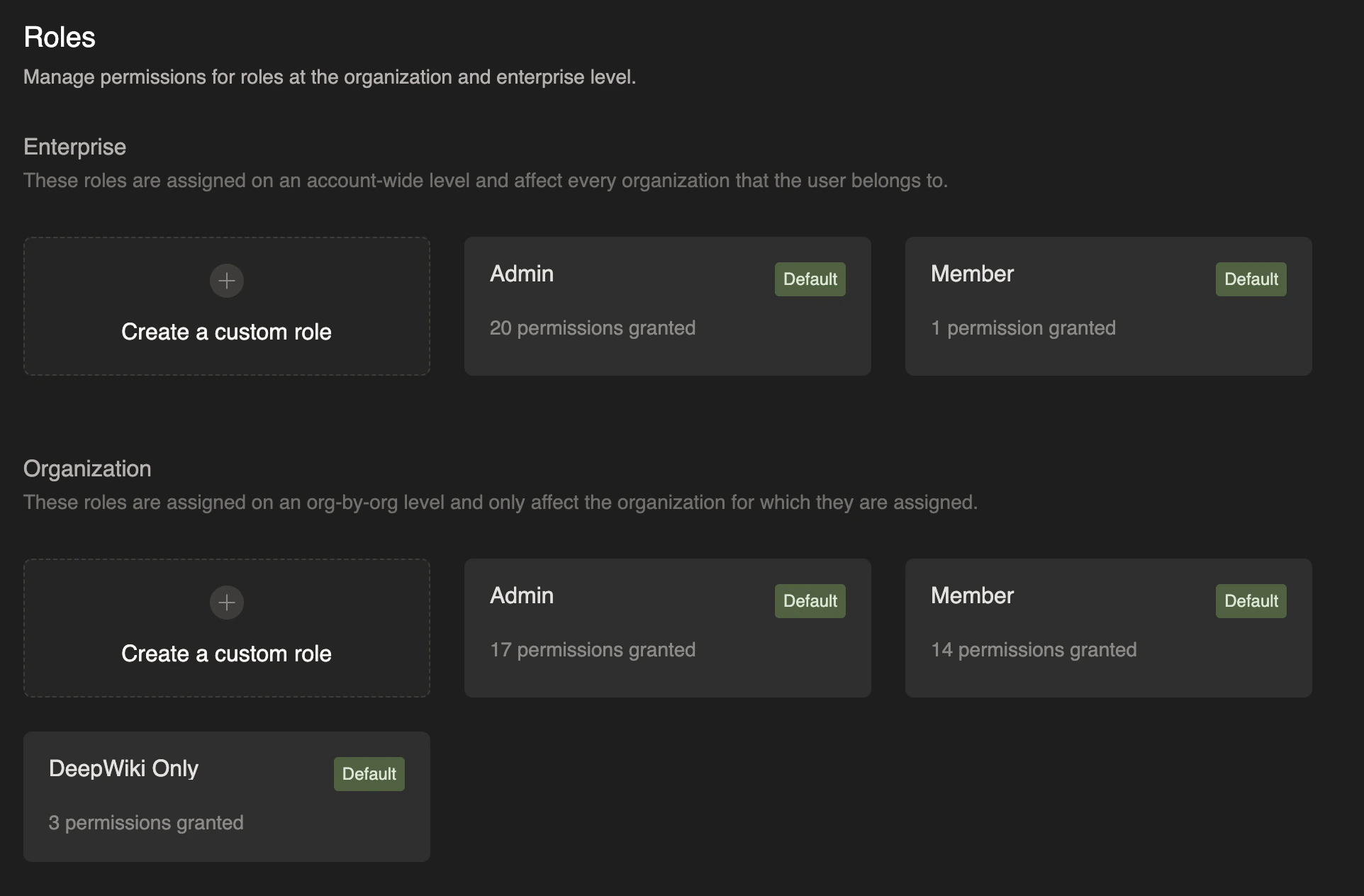 To create a custom role:
1. Navigate to **Enterprise Settings > Membership** and select the **Roles** tab
2. Click **Create role**, then select **Create for enterprise** or **Create for organizations**
3. Provide a descriptive role name
4. Select the specific permissions you want to grant
5. Click **Save changes**
Once created, custom roles can be assigned to individual users or IdP groups through the membership management interface:
* Enterprise admins or users with the **Manage Account Membership** permission can go to **Enterprise Settings > Membership**, select the **Members** tab (or the **Groups (IdP)** tab for IdP groups), and assign account-level roles
* Please note that this is the same set of users who are able to create, edit, and delete custom roles
* Organization admins or users with the **Manage Organization Membership** permission can open that organization's **Settings > Membership** page and assign organization-level roles
* Please note that these users are able to **assign** custom roles on the organization level, but creating, editing, or deleting custom roles requires **Manage Account Membership** (enterprise-level) permissions
We currently do not support multiple roles per user, but this feature is on our roadmap and we plan to support it soon. Each user can currently be assigned only one role per organization and one account-level role.
### Organization-Level Roles
Organization-level roles are assigned on an organization-by-organization basis and do not apply outside of the assigned organization. These roles control access to resources and actions within a specific organization.
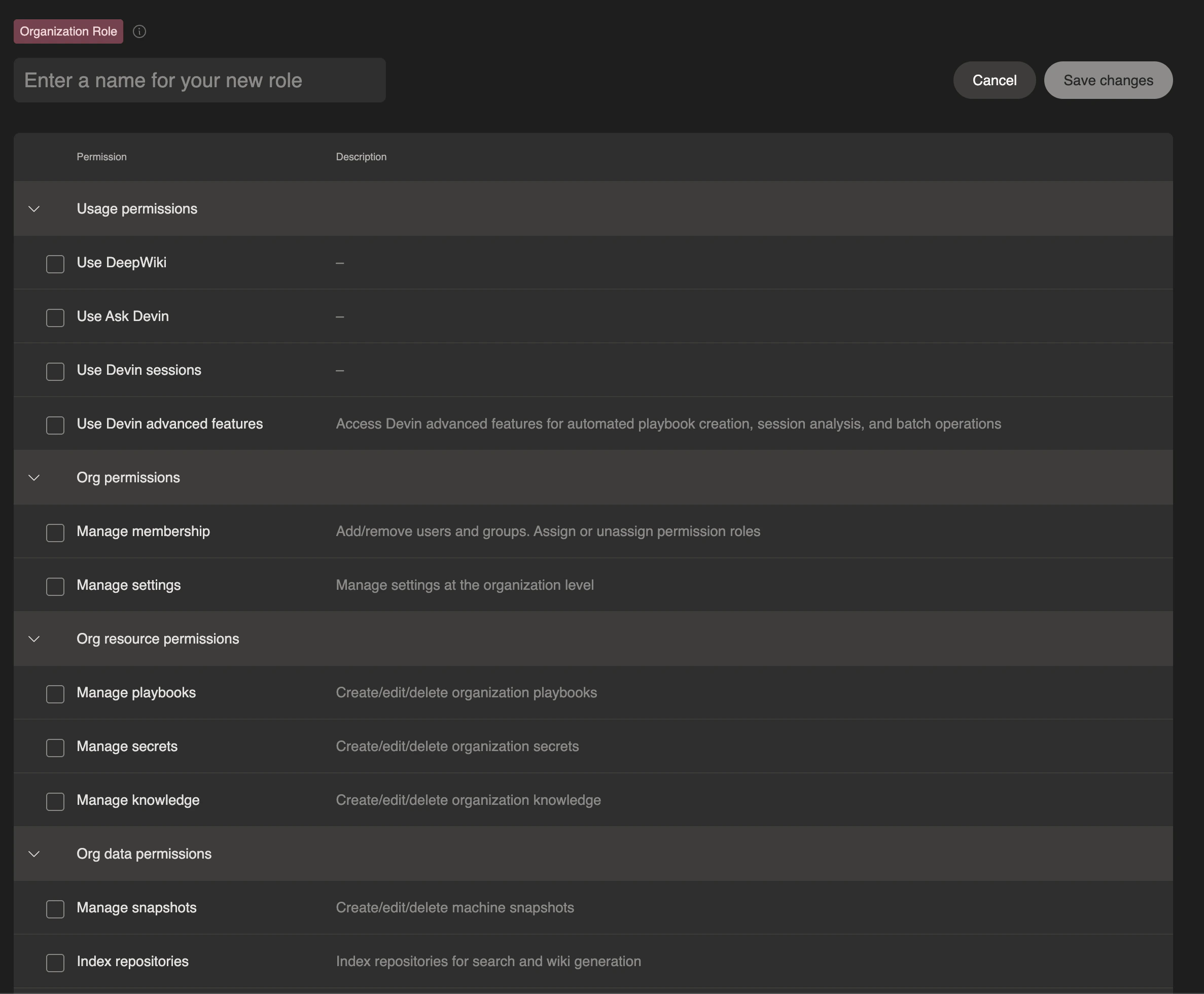
Organization-level roles can be configured with permissions including the following:
Permissions evolve as new features ship. The role editor in the **Roles** tab of Enterprise Settings > Membership always shows the current, complete list.
| Permission | Description |
| - | - |
| **Use DeepWiki** | Access to DeepWiki functionality |
| **Use Ask Devin** | Access to Ask Devin feature |
| **Use Devin Sessions** | Access to create and use Devin sessions |
| **Use Devin Expert Features** | Access Devin expert features for MCP-extended sessions |
| **View Membership** | View organization membership (read-only) |
| **Manage Membership** | Add/remove users and groups. Assign or unassign permission roles |
| **Manage Settings** | Manage settings at the organization level |
| **Manage Playbooks** | Create/edit/delete organization playbooks |
| **Manage Secrets** | Create/edit/delete organization secrets |
| **Manage Knowledge** | Create/edit/delete organization knowledge |
| **Manage Schedules** | Create/edit/delete scheduled sessions |
| **View Automations** | View automations and their invocation history (read-only) |
| **Manage Automations** | Create/edit/delete automations, view their invocations, and view/message the sessions they create |
| **Run Personal Automations** | Allow the user's automations to run sessions as themselves instead of the Automations service |
| **Manage Org Blueprints** | Create/edit/delete org blueprints and snapshots |
| **Manage Repo Blueprints** | Create/edit/delete repository blueprints |
| **Index Repositories** | Index repositories for Ask Devin and DeepWiki generation |
| **Manage Sessions** | Edit and view Devin sessions from other users in the organization |
| **View Sessions** | View Devin sessions from other users in the organization |
| **Impersonate Sessions** | Create Devin sessions on behalf of other users in the organization (service users only) |
| **Manage API Keys** | Create, rotate, and revoke your own [personal access tokens](/api-reference/personal-access-tokens) and legacy API keys |
| **Manage Service Users** | Create/delete service users |
| **Manage MCP Servers** | Create/edit/delete MCP servers |
| **View Metrics** | View organization metrics |
| **View Consumption** | View organization consumption |
| **Devin Review access** | Organization-level Review tiers: manual reviews, review on PR creation, or all review modes; account-level access is inherited |
| **Code scan permissions** | View, use, or manage code scans and findings (when code scans are enabled) |
Users can either build their own custom roles with a specific set of permissions, or they can use one of our three default organization roles:
* **Admin**: Full administrative access within the organization
* **Member**: Can use Devin and manage most day-to-day organization resources (such as knowledge, playbooks, secrets, and snapshots), but not membership, organization settings, or other administrative configuration
* **DeepWiki Only**: Limited access restricted to DeepWiki and Ask Devin functionality
To create a custom role:
1. Navigate to **Enterprise Settings > Membership** and select the **Roles** tab
2. Click **Create role**, then select **Create for enterprise** or **Create for organizations**
3. Provide a descriptive role name
4. Select the specific permissions you want to grant
5. Click **Save changes**
Once created, custom roles can be assigned to individual users or IdP groups through the membership management interface:
* Enterprise admins or users with the **Manage Account Membership** permission can go to **Enterprise Settings > Membership**, select the **Members** tab (or the **Groups (IdP)** tab for IdP groups), and assign account-level roles
* Please note that this is the same set of users who are able to create, edit, and delete custom roles
* Organization admins or users with the **Manage Organization Membership** permission can open that organization's **Settings > Membership** page and assign organization-level roles
* Please note that these users are able to **assign** custom roles on the organization level, but creating, editing, or deleting custom roles requires **Manage Account Membership** (enterprise-level) permissions
We currently do not support multiple roles per user, but this feature is on our roadmap and we plan to support it soon. Each user can currently be assigned only one role per organization and one account-level role.
### Organization-Level Roles
Organization-level roles are assigned on an organization-by-organization basis and do not apply outside of the assigned organization. These roles control access to resources and actions within a specific organization.
Organization-level roles can be configured with permissions including the following:
Permissions evolve as new features ship. The role editor in the **Roles** tab of Enterprise Settings > Membership always shows the current, complete list.
| Permission | Description |
| - | - |
| **Use DeepWiki** | Access to DeepWiki functionality |
| **Use Ask Devin** | Access to Ask Devin feature |
| **Use Devin Sessions** | Access to create and use Devin sessions |
| **Use Devin Expert Features** | Access Devin expert features for MCP-extended sessions |
| **View Membership** | View organization membership (read-only) |
| **Manage Membership** | Add/remove users and groups. Assign or unassign permission roles |
| **Manage Settings** | Manage settings at the organization level |
| **Manage Playbooks** | Create/edit/delete organization playbooks |
| **Manage Secrets** | Create/edit/delete organization secrets |
| **Manage Knowledge** | Create/edit/delete organization knowledge |
| **Manage Schedules** | Create/edit/delete scheduled sessions |
| **View Automations** | View automations and their invocation history (read-only) |
| **Manage Automations** | Create/edit/delete automations, view their invocations, and view/message the sessions they create |
| **Run Personal Automations** | Allow the user's automations to run sessions as themselves instead of the Automations service |
| **Manage Org Blueprints** | Create/edit/delete org blueprints and snapshots |
| **Manage Repo Blueprints** | Create/edit/delete repository blueprints |
| **Index Repositories** | Index repositories for Ask Devin and DeepWiki generation |
| **Manage Sessions** | Edit and view Devin sessions from other users in the organization |
| **View Sessions** | View Devin sessions from other users in the organization |
| **Impersonate Sessions** | Create Devin sessions on behalf of other users in the organization (service users only) |
| **Manage API Keys** | Create, rotate, and revoke your own [personal access tokens](/api-reference/personal-access-tokens) and legacy API keys |
| **Manage Service Users** | Create/delete service users |
| **Manage MCP Servers** | Create/edit/delete MCP servers |
| **View Metrics** | View organization metrics |
| **View Consumption** | View organization consumption |
| **Devin Review access** | Organization-level Review tiers: manual reviews, review on PR creation, or all review modes; account-level access is inherited |
| **Code scan permissions** | View, use, or manage code scans and findings (when code scans are enabled) |
Users can either build their own custom roles with a specific set of permissions, or they can use one of our three default organization roles:
* **Admin**: Full administrative access within the organization
* **Member**: Can use Devin and manage most day-to-day organization resources (such as knowledge, playbooks, secrets, and snapshots), but not membership, organization settings, or other administrative configuration
* **DeepWiki Only**: Limited access restricted to DeepWiki and Ask Devin functionality
 ### Account-Level Roles (Enterprise Roles)
Account-level roles (also known as enterprise-level roles) are assigned across the entire enterprise and apply to every organization within the enterprise. Users with account-level roles automatically inherit corresponding organization-level permissions in all organizations that they are a member of.
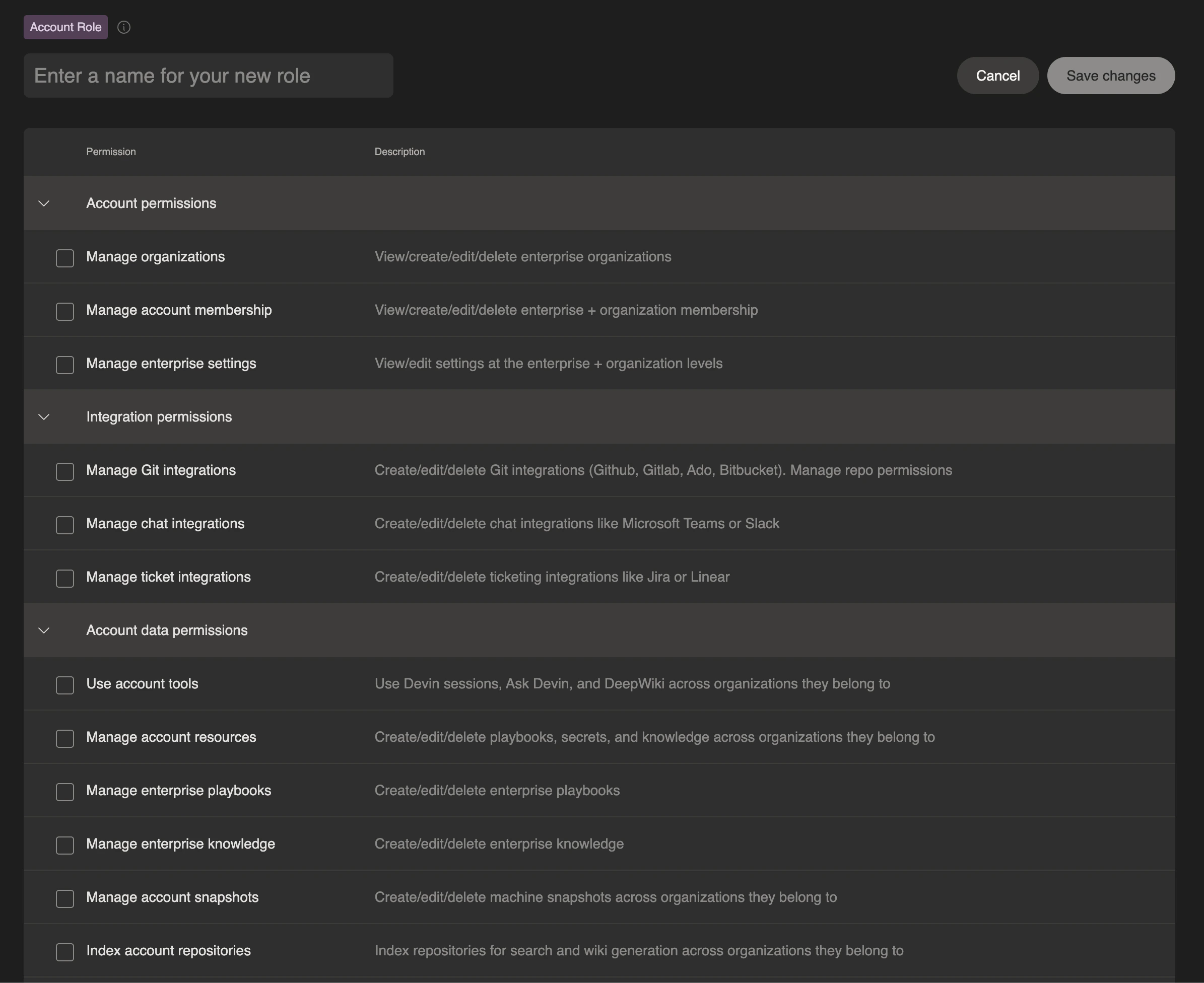
Account-level roles can be configured with permissions including the following:
| Permission | Description |
| - | - |
| **View Organizations** | View enterprise organizations (read-only) |
| **Manage Organizations** | View/create/edit/delete enterprise organizations |
| **Access All Organizations** | Access all organizations in the enterprise, even without direct membership |
| **View Account Membership** | View enterprise + organization membership (read-only) |
| **Manage Account Membership** | View/create/edit/delete enterprise + organization membership. Create/edit/delete custom roles |
| **View Audit Logs** | View audit logs for the enterprise (read-only) |
| **Manage Enterprise Settings** | View/edit settings at the enterprise + organization levels |
| **Manage IP Whitelist** | View/edit IP access list at the enterprise level |
| **View Git Integrations** | View Git integrations (read-only) |
| **Manage Git Integrations** | Create/edit/delete Git integrations (GitHub, GitLab, ADO, Bitbucket) |
| **View Repository Permissions** | View repository permissions (read-only). Implies view Git integrations |
| **Manage Repository Permissions** | Create/edit/delete repository permissions for organizations. Implies view Git integrations |
| **Manage Chat Integrations** | Create/edit/delete chat integrations like Microsoft Teams or Slack |
| **Manage Ticket Integrations** | Create/edit/delete ticketing integrations like Jira or Linear |
| **Use Account Tools** | Use Devin sessions, Ask Devin, and DeepWiki across organizations they belong to |
| **Manage Account Resources** | Create/edit/delete playbooks, secrets, knowledge, and automations across organizations they belong to |
| **Manage Enterprise Playbooks** | Create/edit/delete enterprise playbooks |
| **Manage Enterprise Knowledge** | Create/edit/delete enterprise knowledge |
| **Manage Enterprise Blueprints** | Create/edit/delete blueprints and snapshots across the enterprise |
| **Index Account Repositories** | Index repositories for Ask Devin and DeepWiki generation across the enterprise |
| **Manage Sessions** | Edit Devin sessions from other users across any org |
| **View Sessions** | View Devin sessions from other users across any org |
| **Impersonate Account Sessions** | Create Devin sessions on behalf of other users in the enterprise (service users only) |
| **View Enterprise Infra Details** | View enterprise infrastructure details |
| **Manage Account API Keys** | Create, rotate, and revoke your own [personal access tokens](/api-reference/personal-access-tokens) and legacy API keys, and view or revoke every user's PATs in the enterprise-wide inventory |
| **Manage Account Service Users** | Manage API keys for service users at the enterprise level |
| **Manage Account MCP Servers** | Create/edit/delete MCP servers across organizations they belong to |
| **View Account Metrics** | View enterprise metrics |
| **View Account Consumption** | View consumption for the enterprise (read-only) |
| **Use Local Analytics API** | Access local (Devin Desktop / CLI) analytics for the enterprise via the API |
| **View Personal Analytics** | View your own ACU consumption and usage analytics across the enterprise from the [My analytics](/enterprise/security-access/personal-analytics) page. Requires the `expose-personal-analytics` feature flag |
| **Manage Billing** | View/edit consumption for the enterprise |
| **Use Devin Review (manual)** | Access [Devin Review](/work-with-devin/devin-review) and manually trigger a review on any PR. Base tier — required to view the Review tab |
| **Use Devin Review (on PR creation)** | Everything in manual, plus automatically trigger reviews when a PR is created or marked ready for review |
| **Use Devin Review** | Full auto-review on every push — reviews trigger on PR creation, new commits, and draft marked ready. Granted to all members and admins by default |
| **Manage Devin Review** | Manage auto-review settings, posting options, review rules, and other admin configuration in [Settings > Review](https://app.devin.ai/settings/review). Independent of the usage tiers above — does not grant Review access on its own |
Users can either build their own custom roles with a specific set of permissions, or they can use one of our two default account roles:
* **Admin**: Full administrative access across the entire enterprise
* **Member**: Standard user access across all organizations in the enterprise
### Account-Level Roles (Enterprise Roles)
Account-level roles (also known as enterprise-level roles) are assigned across the entire enterprise and apply to every organization within the enterprise. Users with account-level roles automatically inherit corresponding organization-level permissions in all organizations that they are a member of.
Account-level roles can be configured with permissions including the following:
| Permission | Description |
| - | - |
| **View Organizations** | View enterprise organizations (read-only) |
| **Manage Organizations** | View/create/edit/delete enterprise organizations |
| **Access All Organizations** | Access all organizations in the enterprise, even without direct membership |
| **View Account Membership** | View enterprise + organization membership (read-only) |
| **Manage Account Membership** | View/create/edit/delete enterprise + organization membership. Create/edit/delete custom roles |
| **View Audit Logs** | View audit logs for the enterprise (read-only) |
| **Manage Enterprise Settings** | View/edit settings at the enterprise + organization levels |
| **Manage IP Whitelist** | View/edit IP access list at the enterprise level |
| **View Git Integrations** | View Git integrations (read-only) |
| **Manage Git Integrations** | Create/edit/delete Git integrations (GitHub, GitLab, ADO, Bitbucket) |
| **View Repository Permissions** | View repository permissions (read-only). Implies view Git integrations |
| **Manage Repository Permissions** | Create/edit/delete repository permissions for organizations. Implies view Git integrations |
| **Manage Chat Integrations** | Create/edit/delete chat integrations like Microsoft Teams or Slack |
| **Manage Ticket Integrations** | Create/edit/delete ticketing integrations like Jira or Linear |
| **Use Account Tools** | Use Devin sessions, Ask Devin, and DeepWiki across organizations they belong to |
| **Manage Account Resources** | Create/edit/delete playbooks, secrets, knowledge, and automations across organizations they belong to |
| **Manage Enterprise Playbooks** | Create/edit/delete enterprise playbooks |
| **Manage Enterprise Knowledge** | Create/edit/delete enterprise knowledge |
| **Manage Enterprise Blueprints** | Create/edit/delete blueprints and snapshots across the enterprise |
| **Index Account Repositories** | Index repositories for Ask Devin and DeepWiki generation across the enterprise |
| **Manage Sessions** | Edit Devin sessions from other users across any org |
| **View Sessions** | View Devin sessions from other users across any org |
| **Impersonate Account Sessions** | Create Devin sessions on behalf of other users in the enterprise (service users only) |
| **View Enterprise Infra Details** | View enterprise infrastructure details |
| **Manage Account API Keys** | Create, rotate, and revoke your own [personal access tokens](/api-reference/personal-access-tokens) and legacy API keys, and view or revoke every user's PATs in the enterprise-wide inventory |
| **Manage Account Service Users** | Manage API keys for service users at the enterprise level |
| **Manage Account MCP Servers** | Create/edit/delete MCP servers across organizations they belong to |
| **View Account Metrics** | View enterprise metrics |
| **View Account Consumption** | View consumption for the enterprise (read-only) |
| **Use Local Analytics API** | Access local (Devin Desktop / CLI) analytics for the enterprise via the API |
| **View Personal Analytics** | View your own ACU consumption and usage analytics across the enterprise from the [My analytics](/enterprise/security-access/personal-analytics) page. Requires the `expose-personal-analytics` feature flag |
| **Manage Billing** | View/edit consumption for the enterprise |
| **Use Devin Review (manual)** | Access [Devin Review](/work-with-devin/devin-review) and manually trigger a review on any PR. Base tier — required to view the Review tab |
| **Use Devin Review (on PR creation)** | Everything in manual, plus automatically trigger reviews when a PR is created or marked ready for review |
| **Use Devin Review** | Full auto-review on every push — reviews trigger on PR creation, new commits, and draft marked ready. Granted to all members and admins by default |
| **Manage Devin Review** | Manage auto-review settings, posting options, review rules, and other admin configuration in [Settings > Review](https://app.devin.ai/settings/review). Independent of the usage tiers above — does not grant Review access on its own |
Users can either build their own custom roles with a specific set of permissions, or they can use one of our two default account roles:
* **Admin**: Full administrative access across the entire enterprise
* **Member**: Standard user access across all organizations in the enterprise
 ## Auto Assign a Role based on SSO IdP Group
You can automatically assign roles to users based on their Identity Provider (IdP) group membership. This streamlines user access management by ensuring users inherit the correct permissions upon authentication.
1. Navigate to **Enterprise Settings > Membership** and select the **Groups (IdP)** tab
2. Configure IdP group mappings to associate group names with specific roles
3. When users authenticate via SSO, they automatically receive the role assigned to their IdP group
Your SSO provider must send the `groups` array in the SSO assertion. For detailed setup instructions, see [IdP Group Integration](/enterprise/security-access/idp-groups).
## Best Practices
* **Principle of Least Privilege**: Grant users only the minimum permissions necessary for their role
* **Use IdP Groups**: Leverage IdP group integration for easier management of role assignments at scale
* **Regular Audits**: Periodically review role assignments and permissions to ensure they remain appropriate
* **Descriptive Naming**: Use clear, descriptive names for custom roles to make their purpose obvious
* **Documentation**: Maintain internal documentation of your custom roles and their intended use cases
### Common Issues
If a user is not receiving the expected permission,
* Verify the user is assigned to the correct role for that specific organization
* Ensure the role has the necessary permissions configured
For additional support with role configuration, contact your Devin Enterprise administrator or reach out to [support](mailto:support@cognition.ai).
This documentation is built and hosted on [Mintlify](https://mintlify.com), a developer documentation platform.
## Auto Assign a Role based on SSO IdP Group
You can automatically assign roles to users based on their Identity Provider (IdP) group membership. This streamlines user access management by ensuring users inherit the correct permissions upon authentication.
1. Navigate to **Enterprise Settings > Membership** and select the **Groups (IdP)** tab
2. Configure IdP group mappings to associate group names with specific roles
3. When users authenticate via SSO, they automatically receive the role assigned to their IdP group
Your SSO provider must send the `groups` array in the SSO assertion. For detailed setup instructions, see [IdP Group Integration](/enterprise/security-access/idp-groups).
## Best Practices
* **Principle of Least Privilege**: Grant users only the minimum permissions necessary for their role
* **Use IdP Groups**: Leverage IdP group integration for easier management of role assignments at scale
* **Regular Audits**: Periodically review role assignments and permissions to ensure they remain appropriate
* **Descriptive Naming**: Use clear, descriptive names for custom roles to make their purpose obvious
* **Documentation**: Maintain internal documentation of your custom roles and their intended use cases
### Common Issues
If a user is not receiving the expected permission,
* Verify the user is assigned to the correct role for that specific organization
* Ensure the role has the necessary permissions configured
For additional support with role configuration, contact your Devin Enterprise administrator or reach out to [support](mailto:support@cognition.ai).
This documentation is built and hosted on [Mintlify](https://mintlify.com), a developer documentation platform.