> ## Documentation Index
> Fetch the complete documentation index at: https://docs.devin.ai/llms.txt
> Use this file to discover all available pages before exploring further.
# Invite your Team
> Invite teammates to your Devin organization, assign roles, and manage members from the Membership settings page on Team and Enterprise plans.
Add members to your Devin organization so you can collaborate with your team and create sessions within the same org.
## Roles
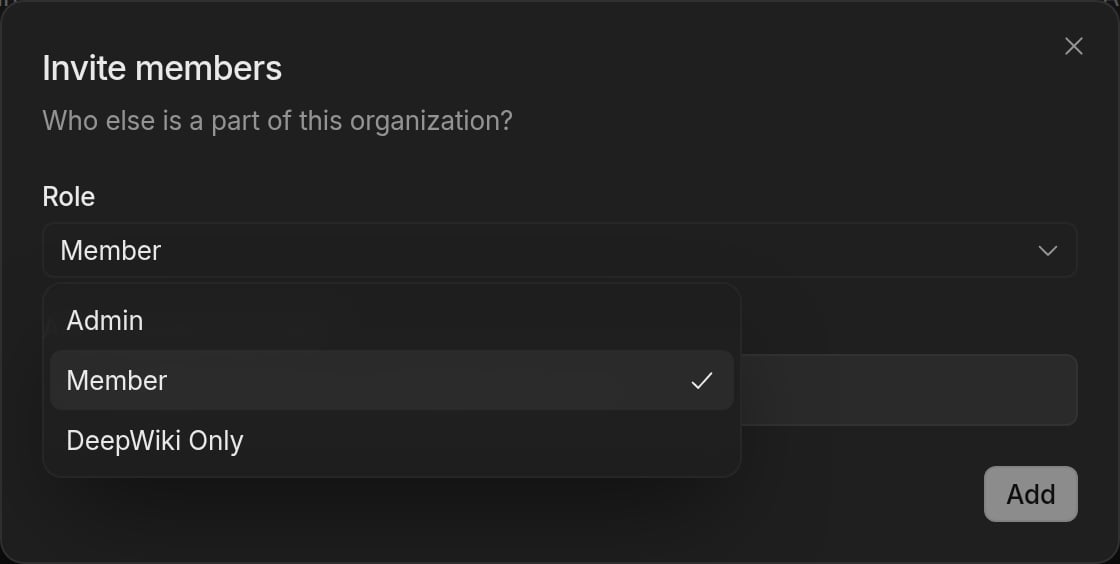
Your organization has three default roles:
* **Member** — Can start Devin sessions and view and contribute to most of your organization's resources, such as knowledge, playbooks, secrets, and environment snapshots.
* **Admin** — Has all member permissions, plus the ability to set up and manage billing, organization integrations, membership, and other organization-level settings.
* **DeepWiki Only** — Access limited to DeepWiki and Ask Devin.
Enterprise plans can also define [custom roles](/enterprise/security-access/custom-roles) with fine-grained permissions.
## Inviting members
To invite new members to your organization:
1. Navigate to **Settings > Membership** in the sidebar, or go to [app.devin.ai/settings/members](https://app.devin.ai/settings/members).
2. Click **Add member** to open the **Invite members** dialog.
3. Select a role for the invited users.
4. Enter the email addresses of the people you want to invite.
5. Click **Add**.
Invited users will receive an email with a link to join your organization. Once they accept the invitation, they will appear in the members list.
 ## Managing members
From the **Membership** settings page, users who can manage membership can:
* View all current members and their roles
* Change a member's role
* Remove members from the organization
Admins can invite new members, change roles, and remove members by default. On Enterprise plans, users with a [custom role](/enterprise/security-access/custom-roles) that grants the **Manage Membership** organization permission or the **Manage Account Membership** enterprise permission can manage membership too.
This documentation is built and hosted on [Mintlify](https://mintlify.com), a developer documentation platform.
## Managing members
From the **Membership** settings page, users who can manage membership can:
* View all current members and their roles
* Change a member's role
* Remove members from the organization
Admins can invite new members, change roles, and remove members by default. On Enterprise plans, users with a [custom role](/enterprise/security-access/custom-roles) that grants the **Manage Membership** organization permission or the **Manage Account Membership** enterprise permission can manage membership too.
This documentation is built and hosted on [Mintlify](https://mintlify.com), a developer documentation platform.